Simulation model
The Vollo IP simulation model (vollo-ip-sim) is a simulation-only stand-in for
the Vollo IP Core. It lets you bring up and test the host/RTL interfaces
(AXI4-Lite config + AXI4-Stream model-select / input / output) under AMD
XSim or Siemens QuestaSim/ModelSim, without hardware or a Vollo
license.
It is released alongside the SDK as a self-extracting vollo-ip-sim-<version>.run
archive, available from the GitHub Releases page. Running it
presents the EULA and unpacks a vollo-ip-sim-<version>/ directory containing the
model, the DPI driving code, and a run.sh entry point. See the bundle's own
README.md for unpacking and a quick start; this page is the full walk-through.
What it is
Every flow simulates rtl/vollo_ip_core.sv — the same wrapper top you
integrate, with the discovery registers and config window of the Vollo IP
Core. It provides two compute backends:
- stub — no compute. Each model is described by four config words (input size, output size, delay, enable); output beats carry synthetic metadata (beat index + model). Needs no libraries and is synthesizable.
- vm — runs an actual
.volloprogram through an embeddedvollo-rt, so the output is the true inference result. Needs the Vollo SDK.
The stream data width is BLOCK_SIZE * 16 bits; the released build uses
BLOCK_SIZE=32 (512-bit). As on the IP core, the input stream is plain
tvalid/tready/tdata (sizes come from config, not stream framing); the
output stream carries tkeep/tlast to mark the end of each packet and which
bytes are valid.
Requirements
- A SystemVerilog simulator, selected with
VOLLO_IP_SIMULATOR:vivado(default) — AMD Vivado/XSim. Either putxvlog/xelab/xsimonPATH, or setVIVADO_SETTINGS=/path/to/Vivado/settings64.sh.questa/modelsim— Siemens QuestaSim/ModelSim. Putvlog/vsimonPATHyourself (and any license env your install needs).
- A C compiler (
cc/gcc) andpython3. - For anything involving a
.volloprogram:VOLLO_SDKpointing at the unpackedvollo-sdk-*/directory. No flow needs a Vollo license.
The three flows
run.sh <flow> exposes three flows for running the simulation model
(./run.sh --help lists them with their options). They differ in who programs
the config bus and which compute backend runs:
- registers — the bundled python client writes the stub's per-model config
registers over DPI with explicit values. No
.vollorequired, nothing from the SDK touches the bus: good for bring-up, and as a reference for driving the stub if you can't hook up the DPI. - vollo-cfg — the
vollo-cfglibrary programs the bus withvollo_cfg_load_program, which works on all versions of the Vollo IP (hardware, stub and vm).
| Flow | Config programmed by | Compute | Needs | What it proves |
|---|---|---|---|---|
registers | python client (DPI) | stub | — | the host/RTL protocol end to end (synthetic output) |
vollo-cfg-stub | vollo-cfg library | stub | SDK | your config path, programmed by vollo-cfg |
vollo-cfg-vm | vollo-cfg library | vollo-rt | SDK | true, bit-accurate inference output |
registers takes its sizes from the command line (zero dependencies beyond a
simulator + C compiler + python3), or from a .vollo's metadata if you
pass one (which needs $VOLLO_SDK for vollo-tool). In every flow,
model-select and input data are driven over DPI by the python client.
# Zero-dependency: stub configured over DPI with explicit sizes.
./run.sh registers --input-size 64 --output-size 64

# Same, but the sizes come from a program's metadata (needs $VOLLO_SDK):
./run.sh registers path/to/program.vollo

# Config programmed by the vollo-cfg library; stub compute (needs $VOLLO_SDK):
./run.sh vollo-cfg-stub path/to/program.vollo

# Same library, vm compute: bit-accurate inference through vollo-rt (needs $VOLLO_SDK):
./run.sh vollo-cfg-vm --check-method identity path/to/program.vollo
The released build is BLOCK_SIZE=32, so use a matching b32 program (the SDK
ships example/identity_b32.vollo). Select the simulator with
VOLLO_IP_SIMULATOR (default vivado), e.g. to run the on-ramp under
QuestaSim:
VOLLO_IP_SIMULATOR=questa ./run.sh registers --input-size 64 --output-size 64
Each run prints its work directory and the simulator log, and exits non-zero
unless it sees All tests passed.. The work directory is kept either way, so
you can inspect the logs and the waveform afterwards; on failure the relevant
logs are also dumped to stderr. To choose its location (instead of a fresh temp
dir), set WORKDIR.
Note: the DPI layer uses a Unix domain socket, whose path is limited to ~108 characters. If you point
WORKDIRat a very deep directory the run can fail withfailed to open DPI Unix socket server; use a shorterWORKDIR. The default temp directory is short and unaffected.
Checking the output on the vm backend
The vm backend runs true inference, so its output can be checked. run.sh vollo-cfg-vm offers two ways to do that, and they are alternatives:
-
--check-method— compare the output against a known-good value:identity(the default) drives an input equal to the expected output, so it only makes sense for an identity program.reference=path/to/<prefix>_expected_<index>_<step>.npycompares against reference tensors.<index>and<step>are integers:<index>is the tensor index (in tensor order) and<step>the timestep/sample. You pass only the_expected_file; the matching<prefix>_input_<index>_<step>.npyinput files in the same directory are picked up automatically by their shared prefix. If no_input_files are present the check falls back to a synthetic input (and then only supports a single-output model); a partial set of input files for a step is an error.
The reference comparison is exact (bit-for-bit on the bf16 wire bytes), with no tolerance. It is meant for regression against Vollo's own reference vectors — a tensor exported from your framework will almost never match exactly, since Vollo runs in bf16 rather than the framework's float32.
-
--input/--save-output— feed your own input and save the actual output, so you can compare against your framework yourself, with your own tolerance. This is the right choice for validating a compiled model against PyTorch or TensorFlow:# Feed your own input; write the actual inference output as a float32 .npy. ./run.sh vollo-cfg-vm --input my_input.npy --save-output my_output.npy path/to/program.volloPass one
--inputper input tensor, in tensor order; for a model with multiple output tensors the results are written tomy_output_0.npy,my_output_1.npy, and so on. Save the.npyfiles asfloat32with the model's tensor shapes (fromvollo-tool program-metadata); the harness converts to the model's precision. You can then diffmy_output.npyagainst your reference output in Python:import numpy as np np.testing.assert_allclose(reference_output, np.load("my_output.npy"), atol=1e-2, rtol=1e-2)
If all you need is to check a compiled program's numerics against your source
model — with no RTL/host-interface simulation — you don't need this model at
all: load the program into the Vollo compiler's bit-accurate VM in Python
(vollo_compiler.Program.load(...).to_vm().run(...)) and compare there. The
vm backend here runs that same VM; --save-output gives you its result out of
the RTL simulation. See the compiler simulation
docs.
Architecture
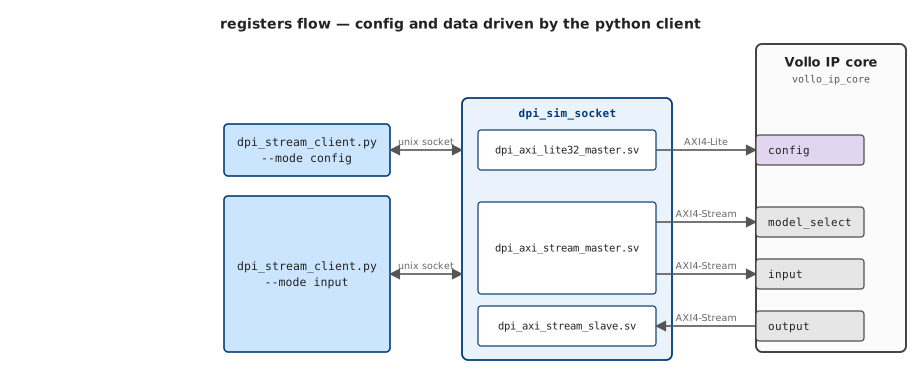
vollo_ip_core has its config interface (config, AXI4-Lite) on one edge
and its data interfaces (model_select, input, output, AXI4-Stream) on
the other. Two things can program config: the vollo-cfg library
(vollo_cfg_load_program, same as on hardware), or the bundled python client
writing explicit register values (the registers flow). The data streams are
driven by the python client (--mode input), or by your own RTL once you
integrate.
In simulation, the host-side drivers don't touch the IP's buses directly: each
goes over a Unix socket into the simulator and through a DPI layer —
dpi_axi_lite32_master.sv / dpi_axi_stream_master.sv drive the IP's AXI buses.
That whole DPI layer is bundled scaffolding you don't ship; your own RTL drives
the IP's ports directly (stages 2–3 below).
In the diagrams, colour shows ownership: green is the vollo-cfg library
(the production Myrtle software), blue is bundled sim tooling (the host clients and
the dpi_sim_socket DPI layer), orange is user code — the parts you build. The
IP's own ports are neutral (purple = AXI4-Lite, grey = AXI4-Stream).
How the simulation is driven (DPI)
A small socket bridge (dpi/dpi_sim_socket.c) connects the SystemVerilog
testbench to host-side drivers over a Unix socket:
dpi/dpi_axi_lite32_master.svdrives the config AXI4-Lite bus.dpi/dpi_axi_stream_master.svdrives the model-select + input streams.dpi/dpi_axi_stream_slave.svcaptures the output stream and routes its beats back over the socket (the slave counterpart to the stream master).dpi/dpi_stream_client.pyis the host scenario runner (registers config + input + output checks); config writes go through the wrapper's config window at0x10_0000, like every other agent on the bus. It never reads a.volloitself — program loading isvollo-cfg's job, viadpi/vollo_cfg_socket_loader.c, the bridge that runs thevollo-cfglibrary against the simulated config bus.
The registers flow drives both buses straight from the python client over
this DPI layer — no .vollo, no SDK:
The vollo-cfg-stub / vollo-cfg-vm flows are the same, except config is
programmed by the vollo-cfg library instead of the python client — that's
stage 1 of the integration below.
Integration stages
The model lets you replace one piece at a time with your own; each stage swaps
one block and leaves the rest in place. Across all three, config is always the
vollo-cfg library — what you take over is first the data path, then the
config transport beneath vollo-cfg. Each stage is one concrete script:
| Stage | You provide | You run |
|---|---|---|
| 1. Fully bundled | just a .vollo | run.sh vollo-cfg-{stub,vm} |
| 2. User data path | your data-path RTL | example/user-data-path/run.sh (a worked stage-2 example) |
| 3. User config transport | your config-bus driver too | your sim, with vollo-cfg hooked up to it however you like |
1. Fully bundled
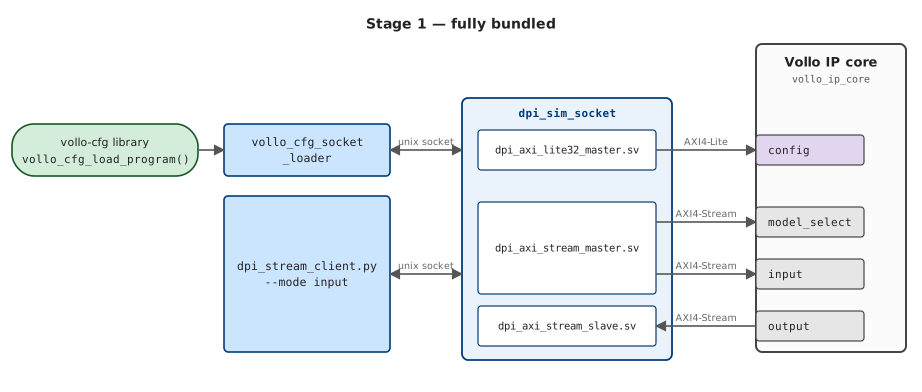
vollo-cfg (through vollo_cfg_socket_loader) programs config, and
dpi_stream_client.py --mode input drives the streams and checks output. This
is what run.sh runs for you:
./run.sh vollo-cfg-vm --check-method identity path/to/program.vollo
(The zero-dependency registers flow is the same picture with the python client
driving config too, instead of vollo-cfg.)
2. User data path
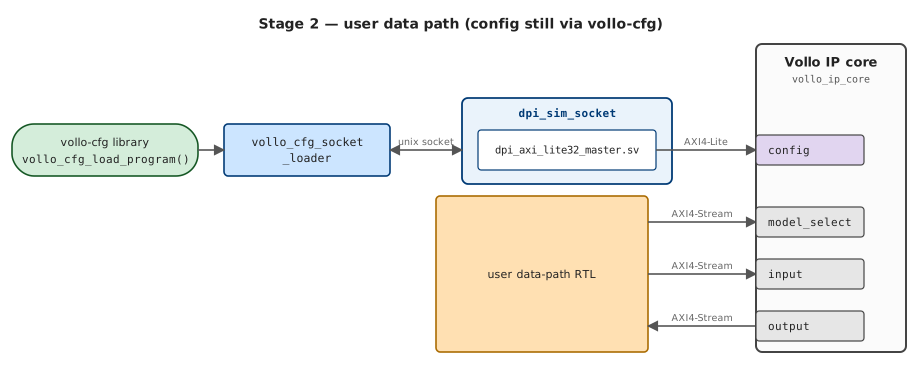
Connect your RTL to the model_select / input / output AXI4-Stream ports of
rtl/vollo_ip_core.sv and drop the python data client and the DPI stream
master/slave. Keep the config bus wired to dpi/dpi_axi_lite32_master.sv + the
socket bridge (dpi/dpi_sim_socket.c) — config is unchanged, still vollo-cfg.
The bundle ships a complete worked example of this at
example/user-data-path/ — a testbench + your-RTL-goes-here data path + a
run.sh that builds, launches, programs config and checks the result. Start
there:
cd example/user-data-path && ./run.sh # identity in == out, driven by the example's own RTL
Its README.md is the reference for the data-path contract — beat width
(512-bit / 64-byte), model_select = one beat carrying the model index,
ceil(size/64) input/output beats, tkeep/tlast, and how to get the sizes
from the program metadata. Note the data path needs no synchronization with the
config load: the core buffers model_select/input (deep FIFOs) and starts the
request once the program is loaded, with ordinary AXI4-Stream tready
backpressure if you outrun the buffer — so you just drive the streams.
Under the hood the example uses two standalone tools, so you can drop them into your own build:
# build the deps your testbench compiles against -- the hw-config ROM includes
# (generated_hw_config_{case,localparams}.svh) + dpi_sim_socket.so:
dpi/scripts/prepare_dpi.sh --backend vm path/to/program.vollo
# compile + launch your own testbench, exporting the socket path its DPI master
# opens; then program config over that same socket:
export DPI_SIM_UNIX_SOCKET_PATH="$PWD/dpi.sock"   # your testbench opens this
# ... compile (all sources as SystemVerilog) and launch your sim here ...
dpi/scripts/drive_config.sh --unix-socket "$DPI_SIM_UNIX_SOCKET_PATH" path/to/program.vollo
The middle "compile + launch your testbench" step is the part you own; the
example's README.md documents its full contract — the source list, the required
+define+s, the dpi_sim_socket DPI library, and the DPI_SIM_UNIX_SOCKET_PATH
socket handshake. That middle step is all run.sh adds: it calls the same
prepare_dpi.sh and drive_config.sh around its own testbench — so your build
gets config programmed by the same vollo-cfg loader and checks against the same
bit-accurate output.
3. User config transport
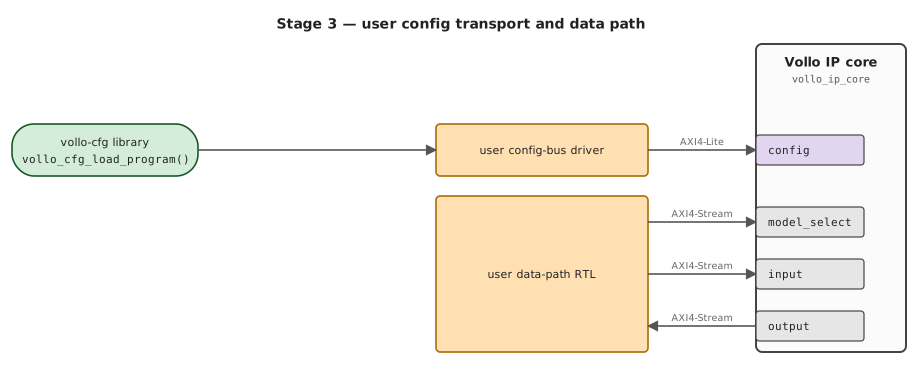
An optional final stage is to connect the vollo-cfg library to your own
simulation directly, in place of drive_config.sh (the DPI lite master +
socket). It is still the same vollo-cfg library issuing the same
vollo_cfg_load_program writes — only how those config reads/writes reach your
DUT changes — so it matches your card config-bus setup on hardware. How you make
that connection is up to you; dpi/vollo_cfg_socket_loader.c is one worked
reference — it links the SDK's lib/libvollo_cfg.a and feeds the library's
config reads/writes to the socket, so you can read it to see how the API is
called and then bridge it to your simulation however suits you.